Ad retargeting has become a game-changer for many businesses – and can be for your resume business too.
Essentially, this is how it works:
When a visitor views a page on your site containing your Facebook pixel, their device receives a cookie. When that same visitor logs into their Facebook account/feed, they are presented with your paid ad that encourages them to revisit your site.
There could be many reasons WHY someone visits your site but doesn’t buy or make contact. The painful truth is that many people who read your content and review your offers will not take the relationship any further.
Be Relevant/Wanted/Needed
A Facebook ad should present a high-value offer encouraging people to take action now without delay, e.g., discounted offer, enticing lead magnet, etc.
Facebook enables you to present different ads to people based on whether they visited your website or a specific page or offer. Your ads should be customized based on where individuals dropped off your site. This means offering different paid retargeted ads that align with where visitors’ left.
For example, you can retarget prospects who visited your e-commerce page but didn’t complete the purchase.
You can also create custom audiences of existing customers and prospects based on certain behaviors (e.g., click or page view).
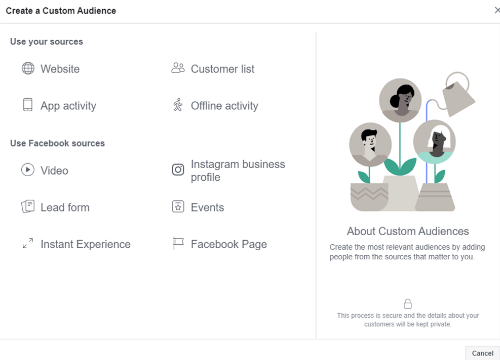
Ad retargeting through sites like Facebook (and Google, Yahoo!, and Bing) enables you to build brand awareness and further build what some consider a slow and steady courting relationship.
GETTING STARTED
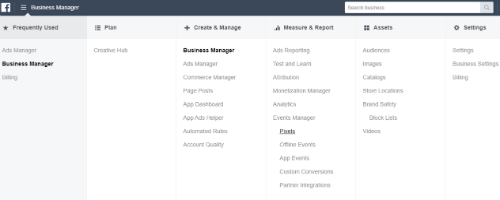
Start your Facebook advertising journey by creating a Facebook Business Manager account.
THIS IS IMPORTANT: You need a personal Facebook profile to create a Facebook business manager account.
A business account can be created at this link: https://business.facebook.com.
Once your business manager account has been created, it’s time to create and grab the pixel code in your Facebook manager account and install that code into your website.
Are you not very technical? Not a problem.
There are WordPress plugins for those who don’t want to mess with manually adding the pixel code to their site.
Pixel plugins include Tracking Code Manager by IntellyWP and PixelYourSite.
Do you need another plugin? If you’re using the Insert Headers and Footers plugin for other purposes, for example, you can use that plugin instead of installing another.
TYPES OF ADS/OFFERS TO MAKE
The goal is to get started. A great place to start is first focusing on a retargeting ad that sends prospects to your core offer for resume writing services. Simple enough, right?
As you become more comfortable with the Facebook ad manager, expand your retargeted ads to include offers that send people back to your:
- Lead Magnet
- Low-Dollar Offer
- Resume Writing Services
- Upsell/Exclusive Offer
Also, don’t overlook using paid ads to send people to read your blog content. Presenting people with links to your informative, how-to content is a great start to the “know, like, and trust” journey. Presenting prospects with high-value cornerstone content gets you closer to prospects buying from you.
