 WELCOME TO MODULE 3
Woohoo, [memb_contact fields="FirstName"]! You are making some serious progress!
IN THE LAST MODULE, you learned about the best strategies for resume summaries and branding statements. We also introduced you to the situation-action-result (SAR) writing style, which goes a long way to adding OOMPH to resumes.
Some of the additional videos introduced you to:
- Unnecessary resume content
- An interactive resume tool
- Social media additions
- Handling employment gaps
IN THIS MODULE, we're taking you behind the curtain and showing you some "insider tools" that resume writers use to flesh out their content and write more efficiently.
It's all about TOOLS for this module.
Like other professions, resume writers use tools to elevate the quality and effectiveness of their writing.
The tools we've highlighted below are broken down to meet three main purposes:
The first set of tools helps resume writers research terms, acronyms, and job tasks/titles.
The second set of tools improves writing quality. It doesn't matter if you've been a resume writer for 5 minutes or 50 years, you'll always want to improve your written words.
The third set of tools matches job descriptions to resumes. You should know upfront that most ATS tools are unsophisticated and primarily driven by keyword matching, so don't be surprised when software such as these recommends odd (soft skill) keywords, such as "team player" or "strong communications" rather than better (hard skill) keywords.
MUST READ: PLAGIARISM
As you get introduced to tools, we must discuss the sticky subject of plagiarism. For resume writers, plagiarism, in part, is taking other people's content and using it in place of your own.
Consider this scenario: a job seeker hires a professional resume writer to write their resume only to find out later that content from that paid-for resume was recycled from online resources, such as job descriptions, resume examples, etc.
In this module, we recommend several tools to assist with resume writing. However, these resources, including online resume examples, social media profiles, job descriptions, etc., should be used for INSPIRATION ONLY. Avoid using others’ content verbatim. Your clients prefer your unique writing style anyway, so that's a bonus too! 🙂
As always, if you have questions or need help with this module's assignment, contact me at [email protected].
Regards,

BREAKDOWN OF THIS MODULE
- Tools & Shortcuts to Help You Write for Different Job Roles
- Grammar & Writing Tools Used by Resume Writers
- Job Matching/ATS Tools
- Your Module Assignment & Quiz
1. TOOLS & SHORTCUTS TO HELP YOU WRITE FOR DIFFERENT JOB ROLES
Writing resumes at times can be difficult.
Even seasoned resume writers come across new terminology, e.g., job tasks, software, and acronyms. Knowing the tools and shortcuts to familiarize yourself with these unknowns can make all the difference.
Below are tools and shortcuts to improve your knowledge when writing resumes:
A. GOOGLE DEFINE
Google is many things, including a dictionary.
Few folks know about Google Define, despite it being one of the easiest tools to use. It’s our go-to for any acronym, skill, or descriptor we're unfamiliar with.
To use Google Define, visit Google.com and input (without quotes) “define:. “ Then, follow that with the term you need a definition for. You’ll find the best success with one or two-word phrases, though longer, more well-known key phrases can sometimes produce results too.
Check out this example:
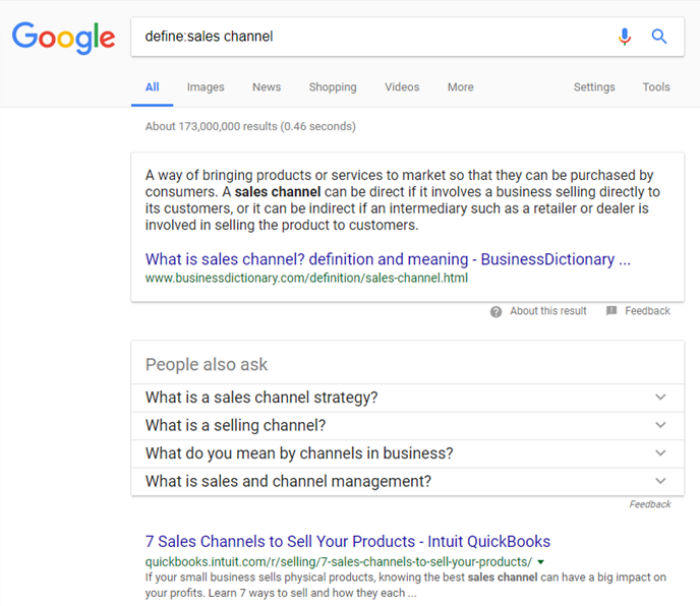
Notice how there is no space after the semicolon (e.g., define: sales channel).
You can search Google Define without the semicolon as well. Your search would look like this:
“define sales channel” (exclude the parenthesis)
Searches like these provide term definitions and suggest acronyms and synonyms. This proves helpful when you’re having trouble thinking of different word pairings.
B. O*NET ONLINE
Another favorite tool for resume writers is O*Net OnLine. O*Net provides quick and advanced search functions based on occupation/job title.
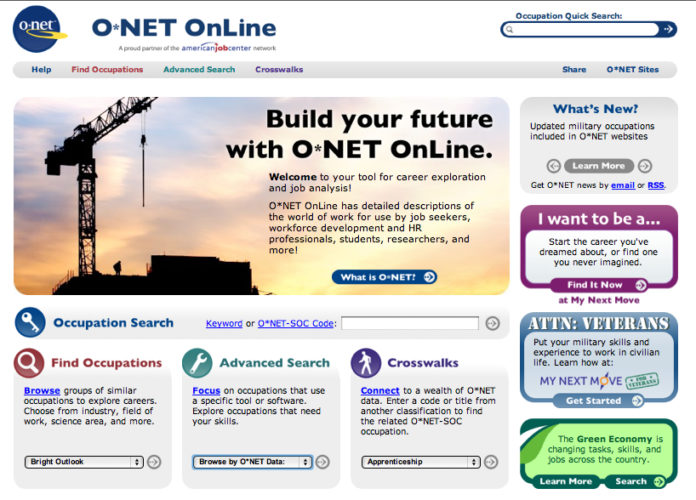
A quick search on O*Net provides job-specific info that's important to resume writers.
For example, a search on O*Net for Supply Chain Managers shows typical tasks, tech skills, and education requirements for those in these roles.
C. INDUSTRY-SPECIFIC TERM SITES
Several industry-specific term sites have popped up in the past few years. These can be helpful, especially when other tools fall short. Here are a few online dictionaries to bookmark for later use:
Computer & Internet Terms: https://techterms.com/browse/
Marketing Terms: https://marketing-dictionary.org/
Business, Tech & Communications: https://www.netlingo.com/dictionary/all.php
To grow your knowledge, and challenge yourself daily, sign up for Tech Target’s Word of the Day: https://whatis.techtarget.com/
If you want to load up on the best dictionaries, thesauruses, and content aggregators on the internet today, RefSeek offers a list of the best 30 dictionaries and thesauri that you can check out here:
[30 Best Online Dictionaries, Thesauri & Definition Aggregators by refseek]
D. BLS OCCUPATIONAL OUTLOOK HANDBOOK
A resource similar to O*Net is the Occupational Outlook Handbook (OOH) provided by the Bureau of Labor Statistics (BLS).
When researching occupations on the bls.gov website, you will find salary forecasts, job outlook, work environment, and task expectations.
An added resource on the BLS site is the “How to Become One” tab, which is particularly useful for looking for institutions that offer licensing and certification programs.
Another useful feature of the OOH is the explanation of different job roles. For example, a quick search under legal occupations shows a link for arbitrators, mediators, and conciliators. After clicking on what these professionals do, you'll find explanations of the differences between these three jobs.
That’s pretty cool.
You can check out the BLS Occupational Outlook Handbook here: https://www.bls.gov/ooh/
E. INDEED/LINKEDIN
A great way to speed up your knowledge of specific job titles and career fields is by using public job descriptions published through sites like Indeed and LinkedIn.
Job descriptions provide a fair amount of information, such as the minimum skills and education the employer seeks, along with any other specialized requirements.
Remember, job descriptions are best used for inspiration. Be careful not to plagiarize. You can accomplish this by paraphrasing, such as using synonyms and changing word arrangements.
F. ASK THE CLIENT
Your client is a tool too.
When you encounter an unfamiliar acronym or term, and none of the above resources prove helpful, don’t be afraid to ask the client for help.
As a resume writer, you're not expected to know everything.
It would be silly for clients (and us, too!) to think we should know every component of every job.
2. GRAMMAR & WRITING TOOLS USED BY RESUME WRITERS
If you’re like us, you’re not a grammar or punctuation expert.
Truth be told, many resume writers rely on tools to elevate their grammatical skills.
Do you want to know popular tools that resume writers use?
These are our go-to tools:
The best software we use is Grammarly (1). Catching the biggest grammar, punctuation, and spelling violations, this tool has saved our professional reputation more than once.
A premium subscription to Grammarly is about $140 annually.
Just beware that the software looks for complete sentences, so you'll get grammar recommendations that aren't always conducive to the writing style we find in resumes.
Another option is to download the Grammarly Chrome extension. You can learn more about that here: https://chrome.google.com/webstore/detail/grammarly-for-chrome/kbfnbcaeplbcioakkpcpgfkobkghlhen?hl=en
A workaround to purchasing a subscription to Grammarly is to use Google Docs (2). Google has made Grammarly available for Google Doc users for free, for now.
Here's a bit more info on how it works:
https://www.businessinsider.com/how-to-use-grammarly-on-google-docs
The Hemingway app (3) is free as well. http://www.hemingwayapp.com/
At times, we find content issues in the Hemingway editor to be more challenging to resolve, making it our least favorite tool. However, it’s incredible nonetheless and worth your consideration.
The final tool on our list is the Resume Content Directory (4) offered here @ResumeBiz.com. The directory contains extensive keyword lists along with ready-for-you and ready-to-inspire-you content to help you write resumes faster. RBIZ members love it!
CAUTION:
You CANNOT, nor should you, use the ready-for-you content in the RESUME CONTENT DIRECTORY to complete any portion of this resume writing mastery program. You CAN use the content in the RESUME CONTENT DIRECTORY to inspire and expand your skills as a resume writer.
A new "kid on the block" for resume writers is the WordTune app (5) for Google Chrome users.
This AI writing tool has been receiving quite a lot of exposure in recent months because of its capabilities beyond the typical grammar and writing resources you may be accustomed to.
Like other tools, WordTune provides scoring on the effectiveness, ease of use, and flexibility of your content.
Yet, the tool goes further to better understand your voice and make recommendations for content rewrites.
3. JOB MATCHING/ATS TOOLS
Let’s dive into online software, which can help you improve content read by resume scanning software (aka applicant tracking systems).
JobScan.co is the most well-known; however, there’s the lesser known, Resymatch.io (aka Cultivated Culture). JobScan offers 5 free scans monthly, while Resymatch boasts of being 100% free, though you must register as a user to see scanned results. Another option is SkillsSyncer.co.
Each software compares a resume against a job description, looking for matching keywords, job titles, education/degree, skills, etc. A score is applied, which gives some sense of security when the resume receives a high score.
We have two points of caution. First, recommendations made by this software can be illogical or unadvisable at times. Second, when a resume matches a job description too much, some resume writers (us included) believe that to be negative.
Using either software, you realize one can’t agree with the others on score - and rarely come within a few percentage points of each other! This tells us that this software is subjective and shouldn’t be a governing authority for resume writers.
Yet, these tools give us some guidance, which is why many in the industry use them. And you should too.
If you find the above recommendations aren’t optimal, here are two alternatives:
4. ASSIGNMENT & QUIZ
Your assignment for this module is three-fold.
First, become familiar with the above tools. Once you do, pick at least 3 tools from the above list and use each to expand and transform your assignment from the last module. We're looking for you to enrichen and ideally increase the size of the job description content by 50% to 75%. Use these tools for inspiration only and avoid "borrowing" content verbatim from any of these tools, because, as we mentioned above, clients prefer content that's unique to them.
Some of the improvements to make include:
- Additional Skills & Job Details (ONet is great for this)
- Fix Punctuation & Grammar Issues (Grammarly)
- Assess The Clarity of Your Content (WordTune)
- Introduce More Keywords/Key Phrases (Indeed/LinkedIn, Keyword Lists Offered by Resume Content Directory @RBIZ)
- Align Resume Content To Select Job Descriptions (JobScan)
- Research Industry Terms/Acronyms; Apply Those to Your Content (Google)
Second, make additional corrections and improvements to the content based on the feedback you received from the last module. This is to include content rewrites and keyword/punctuation recommendations.
Once finished, submit the BEFORE and AFTER content to us at [email protected].
Please allow 1-3 business days for our review and approval once submitted.
Third, complete this module 2 quiz via Google to demonstrate further what you've learned in this program.
