Module 4 – Writing Best Practices For LinkedIn Profiles
 Welcome back to the LinkedIn Profile Writing & Mastery Program (LPWMP).
In this module, there are NO VIDEOS. Because this module focuses on content development, we opted to provide you with examples, how-tos, and other downloadable resources to help you create content.
We’re diving into best practices for selecting vanity URLs to kick things off. Next, we’re showcasing the “meaty areas” where you’ll spend the bulk of your writing energy:
- Headline
- About
- Experience
RECAP
In the last module, we discussed the similarities and differences between resumes and LinkedIn profiles.
We detailed how LinkedIn profiles contain personality and stories while having a more social and conversational tone. LinkedIn profiles have field character limits, but a client profile can grow much larger than a resume. You may remember us mentioning the potential challenge of working with clients with kitchen-sink profiles. LinkedIn profiles are most often written first person WITH pronouns.
On the other hand, resumes are written very tight and are somewhat stiff documents. Despite introducing new resume writing practices in recent years, few resume writers use storytelling when developing resumes. Resumes don’t have character limits, though there’s generally an expected page limit. Resumes are written in first-person WITHOUT pronouns.
Despite their differences, both should be keyword-heavy, emphasizing acronyms and synonyms combined with visual design and skimmable content. Not looking beyond the basic profile, resumes and LinkedIn profiles are very similar.
1. YOUR CLIENT’S PROFILE – PUBLIC WHILE YOU WORK?
There’s SOME debate about whether a client’s profile should be public while you do your magic.
You’ll need to decide whether turning off the visibility of each client’s profile is worth the added effort.
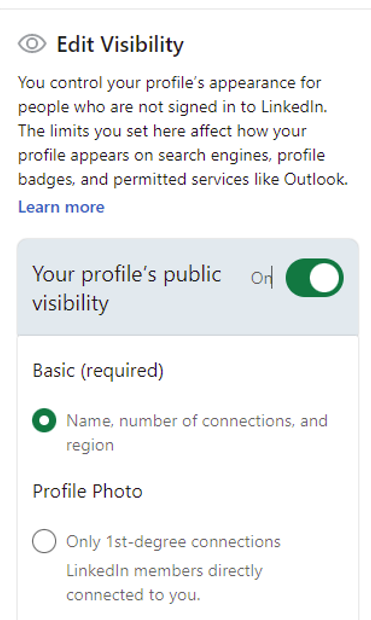
To switch the client profile to private while you work, select “Edit public profile and URL.” Then, click the toggle next to “Your profile’s public visibility” from ON to OFF. Easy enough, right?
2. PICKING VANITY URLs
When starting any LinkedIn profile, your first step should be to secure an optimal vanity URL for your client if they haven’t already. There are only so many URLs available, so grabbing the best one for your client should be a priority.
Vanity URLs need at least 3 characters and no more than 100. LinkedIn has drastically expanded the number of URL characters in recent years, going from a maximum of 30 to 100.
Despite the added characters, your goal should be to pick something short and easy for your client to remember.
Such as linkedin.com/in/sallysmith (first/last name).
Too often, your first URL choice will be unavailable, especially for those clients who have somewhat common names.
So, here are a few additional options to choose from:
- linkedin.com/in/firstnameinitiallastname (e.g., sjohnson)
- linkedin.com/in/lastnamefirstname (e.g., johnsonsally)
- linkedin.com/in/saj (first initials for first, middle, and last names)
A lesser-known option is to include text that details what the client does. For example:
- linkedin.com/in/firstnamelastnameabbrevjobtitle (i.e., sallyjohnsonsales or sallyjohnsonhr)
For now, dashes and numbers are the only acceptable additions to LinkedIn vanity URLs.
Spaces, underscores, or special characters aren’t permitted.
NINJA TRICK: For those instances when you can’t secure the best looking URL, yet you still need something short for the resume, look into link shortening services such as Rebrandly and Sniply. Both services are free and give you the opportunity to create shortened, branded links that can be ideal for client resumes.
3. WRITING HEADLINES
If you wrote a resume for the client, use the RESUME HEADER as inspiration for writing the LINKEDIN HEADLINE.
They shouldn’t be identical, though they should look related.
Your goal is to write LinkedIn headlines encouraging HRMs and recruiters to reach out, despite never seeing the client’s resume or the remainder of their profile.
This is your ideal outcome when writing LinkedIn headlines.
They need to be excellent. They need to be eye-catching. They need to “sell” their clients to potential new employers.
LINKEDIN HEADLINE FORMULA
As with everything you do in your resume writing business, you’ll want to systemize how you produce LinkedIn profiles. This is done by using established formulas and methods to create unique, keyword-heavy headlines.
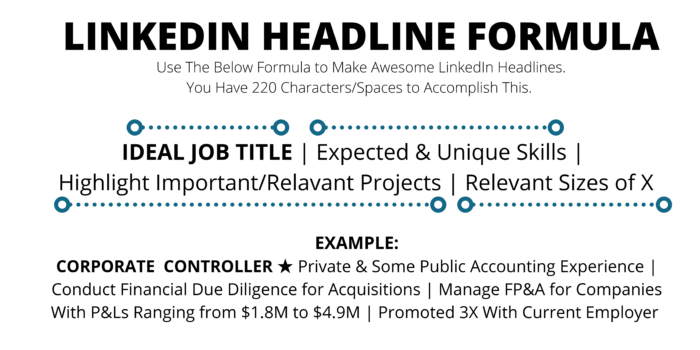
To help you create LinkedIn headlines in just a few short minutes, we created this formula for you to reference:
HACK: We’ve made this formula available for download via Google Docs. See the link below. Ensure that you’re logged into your Google account so you’re given direct access without having to request access.
In 2020, LinkedIn expanded the length of the profile headline, going from 120 to 220 characters. The added space allows us to showcase our client’s unique skills, essential and relevant projects, and other vital notables.
Notice the above headline example for a Corporate Controller. We learn significant bits about her within such a short amount of text.
For example, we notice her ideal job target: controller positions. We learn that she can fit into a private or publicly traded company. We also understand that she’s managed financials for moderate-sized businesses. And we recognize that she’s been promoted several times, which goes a long way to show companies that she’s valued and does excellent work with her current employer.
4. LINKEDIN ABOUT SECTION
The About section of a LinkedIn profile is very versatile.
For example, an about section (formerly summary) can include:
- Career Stories
- Industry Insights
- Calls-to-Action
- Contact Information
- Keyword Lists
- Recent & Relevant Projects
- Most Notable Achievements
- Bird’s-Eye View of Certain Financials (e.g., Sales, P&Ls, Budgets, Overhead Reductions)
With 2,600 characters, the LinkedIn About section is viewed as prime real estate within online profiles. Positioned at the top of a profile, it’s one of the first categories readers see. This is why you’ll want to focus much of your content on what’s most recent and relevant about your client.
Write using pronouns, and don’t be afraid to add personality to all content areas.
We often tell writers that the fastest way to complete the LinkedIn About section is to take the resume summary and rework that content to make great About content. Of course, this only works for those who write an initial resume. Remember, clients don’t want a copy-and-paste job. When they invest in LinkedIn content, they don’t want their profile to look verbatim to the resume.
If you scanned the LinkedIn Made Simple guide, you noticed that we showed a resume summary and how that was spun into a LinkedIn profile. Here’s another copy, just in case you missed it:
Example of Resume Summary
VP of Customer Care – Leverage & Improve Programs, Processes, and Systems That Enhance The Customer Experience & Increase Customer Satisfaction Levels
Take complex projects and programs from conceptualization (data gathering and analysis) to subsequent development and implementation. Manage the projects and programs that support sales and customer service activities, i.e., portfolio development and referral strategies. Focus efforts across multiple departments and functions, explicitly handling projects that improve human resources, financial management, customer service/ management, and retail operation sales.
Example of LinkedIn About Section (based on the above resume summary)
Thanks for visiting my LinkedIn profile.
I’m a VP of Customer Care with JohnsonBQ, Inc., overseeing customer service and relationship-building activities for a CALL CENTER HANDLING 30,000 CALLS per month. My current employer aims to optimize the complete customer experience, starting with the initial call and progressing throughout the client relationship. I identify and IMPROVE THE PROGRAMS, PROCESSES, AND SYSTEMS that employers use to identify ways to improve management.
A new component of my current role is to analyze and LEVERAGE DEPARTMENTAL DATA. By reviewing micro and macro data for my department, I SUPPORT AND IMPROVE SALES and customer service activities. I also assist with human resources, financials, and customer service.
In short, I CLOSE GAPS IN PERFORMANCE for the customer care team and work closely on preserving customer satisfaction and revenue.
Please feel free to CONTACT ME if you’re within a management or executive-level customer care job — my email is [email protected].
A significant caveat to LinkedIn is its limited design capabilities.
For example, we cannot add bold, italics, or underlined content in LinkedIn profiles.
We can, however, CAPITALIZE OUR WORDS, which adds emphasis to specific data.
We can use dashes (-) and the equal sign (=) to create lines in our text.
——————————————————————–
========================================
We also have other tools at our fingertips.
INTRO TO SYMBOLS & EMOJIS
Here are a few BASIC SYMBOL OPTIONS pulled from a computer’s character map:
- ○ ❏ ■ □ ▬ ✰ ★ ✦ ⋆ ❉ ► ➤ ➽
You may also need to use one of these at times: ™ © You can find these two examples under your computer’s character map. Or, if you’re using Word, type ™ or (c), and the software will auto-populate those.
We wouldn’t dream of adding COLORFUL EMOJIS to our resumes; however, online profiles are an entirely different ballgame.
Here are a few that you can copy/paste to get you started:
✌ ✍ 👌 🏆 ⭐ 📚 👍 🍂 🔥 🌱
Want more? For MORE EMOJI OPTIONS, click here.
The hardest part of writing LinkedIn About sections seems to be the starter sentence, so we’ve put together 5 examples to help you kick off your next LinkedIn About area.
See the below link to download this resource.
5. EXPERIENCE
When fleshing out the Experience section in a LinkedIn profile, you have two options.
First, copy your resume content and paste that into the appropriate position on LinkedIn. You’re probably thinking, “what?” No rewriting. No transitioning the content to be first-person with pronouns. Nope. We’ve been producing LinkedIn profiles for years, and we often take the content from the resume and copy it verbatim into the Experience section.
Clients don’t seem to expect any different, making a time-saver.
Second, if you’re starting with the LinkedIn profile (and not writing a resume), you’ll need to choose between the following 2 options.
1. Set up each job description content like you would in a resume; possibly a mix of paragraph and bullet points or a straight-up bullet point format
OR
2. Present the content using the techniques we outlined previously in this module; e.g., using first-person with pronouns, presenting stories, adding conversational content, and so on.
CAUTION: Check with your client BEFORE adding any work experience to a public profile. For example, there will be times when you select proprietary details should remain private, such as revenue, client names, and specific projects.
To help you collect the correct information from your clients, here’s a list of intake questions broken down by career field:
- Accounting
- Administrative
- Construction/RE
- Customer Service
- Engineering
- Event Coordinator
- Healthcare
- Human Resources
- IT/Tech
- Management/Executive
- Marketing
- Project Manager
- Purchasing/Inventory
- Sales
- Security
6. DOWNLOADS
- LinkedIn Headline Formula
- 10 LinkedIn Headline Examples
- 5 Examples Strategies For Starting Your About Sections
7. NEXT MODULE
In the next module, we dive into “Privacy Settings for Job Seekers.”
LinkedIn has fleshed out the back-end settings of the site in recent years, thereby giving our clients and us more control over profile functionality. For example, we can control who can message and connect with us, who sees our information, and enable us to share our profiles when applying for positions.
There’s a lot there. Some are worth your time. Some not.
There can be too much to decipher for resume writers who don’t want to spend a lot of time figuring out what toggle switches and options will benefit their clients. We’ll simplify that for you and provide a stripped-down list of what account preferences deserve your/your client’s attention.
And you’re probably asking yourself, “Should I even be messing with the client’s profile settings?” We’ll help answer this critical question!
If at any time you have questions, email us at [email protected].
Regards,
ResumeBIZ Team
